
If you’ve ever uploaded photos to your Google Business Profile and found them rejected, you’re not alone. Photos can be rejected for a variety of reasons, including low quality, inappropriate content, irrelevant imagery, or failing to meet Google’s strict guidelines. Understanding why your photos are rejected can help you optimize your images, improve your business listing’s appeal, and enhance your chances of attracting potential customers. In this article, 7ten Digital Marketing will break down the most common reasons for photo rejection, how to avoid them, and best practices for maintaining a professional and effective Google Business Profile.
Google’s Photo Guidelines and Standards
Google has clear guidelines for the photos uploaded to Business Profiles. These rules are designed to ensure that users have a consistent and trustworthy experience when interacting with business listings. Photos must be relevant to your business and provide value to potential customers. They should not include misleading or offensive content, promotional overlays, or inappropriate imagery.
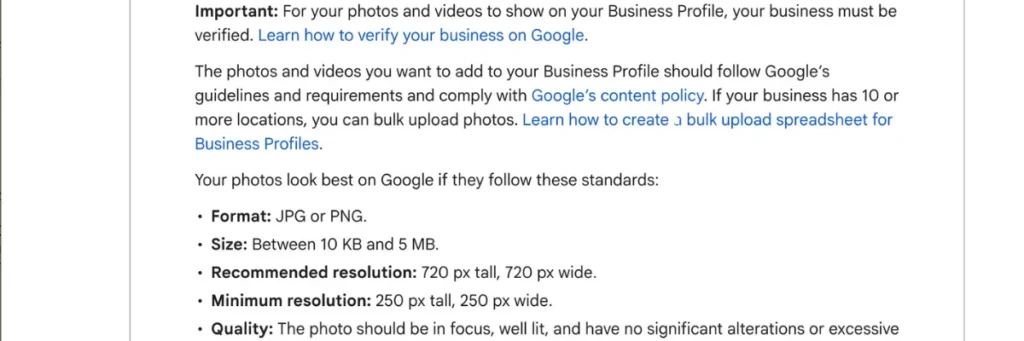
The platform also enforces technical standards, including image size, format, and resolution. Images that are too small, blurry, pixelated, or stretched can be automatically rejected. Google prefers JPEG or PNG formats, with a resolution of at least 720 pixels wide by 720 pixels tall. Understanding these guidelines is crucial to avoid common mistakes that lead to photo rejection.
Common Reasons Photos Get Rejected
Several factors contribute to why photos might not be accepted on a Google Business Profile.
1. Poor Image Quality
Low-resolution, blurry, or dark photos are often rejected. Google wants images that clearly show your business, products, or services. High-quality photos make your listing more attractive and trustworthy.
2. Irrelevant or Misleading Content
Photos that do not accurately represent your business or its services can be rejected. For example, uploading stock images or unrelated graphics may lead to rejection because Google prioritizes authenticity.
3. Copyright and Ownership Issues
Uploading photos that you do not own or have permission to use can result in rejection. Google emphasizes original content from the business owner or authorized staff. Using copyrighted images without authorization is a common reason for photo removal. Having issues with removing your Google profile? Check out this article here.
4. Inappropriate or Offensive Content
Photos containing nudity, violence, hate symbols, or other offensive material will not be approved. Even if your intention is harmless, any content deemed inappropriate can lead to rejection.
5. Excessive Text or Promotional Overlays
Images with large text, promotional banners, or watermarks may be rejected. Google wants photos to provide a clear view of your business, not act as an advertisement.
6. Wrong File Format or Size
If your image is not in the supported format (JPEG or PNG) or doesn’t meet the resolution requirements, Google may automatically reject it. Always check technical requirements before uploading.
How to Ensure Your Photos Are Approved
To reduce the chances of rejection, follow these best practices:
1. Use High-Quality Images
Ensure your photos are sharp, well-lit, and visually appealing. Natural lighting works best, and avoid heavy filters that distort the image. Professional photography can make a significant difference.
2. Upload Relevant Photos
Only upload images that showcase your business, products, services, or staff. Google values authenticity, so make sure your photos reflect real aspects of your business.
3. Avoid Stock Images
Stock photos may look professional, but Google prefers original content. Customers are looking for real images of your business environment, not generic visuals.
4. Respect Copyrights
Only use images that you own or have explicit permission to use. This protects you from potential legal issues and ensures your photos comply with Google’s rules.
5. Optimize File Specifications
Use JPEG or PNG files with a resolution of at least 720×720 pixels. Ensure the file size is not too large or too small, and avoid compressing images excessively.
6. Keep Text Minimal
If you must include text, make it subtle and relevant to the image. Avoid large watermarks or promotional messages that may be rejected by Google.
Tips for a Strong Google Business Profile Photo Strategy
Having an effective photo strategy can improve your business’s online presence and attract more customers. Here are some tips:
1. Showcase Your Products or Services
Highlight your best products, services, or completed projects. Clear and detailed photos help potential customers understand what you offer.
2. Feature Your Team and Workspace
Adding photos of your team or workspace makes your business feel more approachable and authentic. Customers appreciate seeing the people behind the brand.
3. Keep Your Photos Updated
Regularly updating your photos keeps your profile fresh and shows that your business is active. Seasonal or promotional photos can also engage customers.
4. Use Multiple Angles
Provide different perspectives of your business, products, or service areas. Multiple angles help potential customers get a better sense of your offerings.
5. Monitor Photo Performance
Google allows you to see which photos get the most views. Use this data to understand what resonates with your audience and adjust your photo strategy accordingly.

Getting Professional Help
Don’t let rejected photos hurt your online presence. Contact 7ten Digital Marketing today to get expert help with your Google Business Profile. Our team can guide you through photo optimization, profile management, and strategies to boost your business visibility and attract more customers.
Related Posts

Houzz vs Pinterest: Which Platform Is Better for Your Business
Learn More