
If you’re wondering how to remove your business from Google, the short answer is that you can delete or unpublish your Google Business Profile through your account dashboard, or you can mark the business as permanently closed if you no longer operate. The exact steps depend on whether you want the listing completely removed, temporarily hidden, or marked as closed.
Understanding which option is right for you is key because each one affects how your business appears in Google Search and Google Maps. At 7ten Digital Marketing, we help business owners navigate these decisions so they can maintain full control over their online presence.

Why Businesses Want to Remove Their Google Listing
There are many reasons business owners decide to remove their business from Google. Some companies close permanently, while others relocate and want to avoid confusion caused by old addresses or outdated contact information. In some cases, business owners simply no longer wish to manage a Google Business Profile and prefer not to appear in Google Search or Maps results.
Additionally, certain solo entrepreneurs or home-based service providers choose to remove their listing to protect privacy. A Google Business Profile can reveal your approximate service area or home address if not set up correctly. Removing or hiding the listing offers a way to maintain privacy without unnecessary exposure.
Whatever the reason, understanding how Google treats business listings is essential before deciding which removal method is appropriate.
Understanding Google’s Rules Before Removing Your Listing
Before you take any action, it’s important to know how Google handles business information. Google’s goal is to maintain accurate map and search data. That means even if you delete your profile, Google may still show your business if third-party data sources list it elsewhere.
For example, if your business is listed in public directories, government databases, or social profiles, Google can recreate a listing automatically. This is why simply deleting your profile doesn’t always guarantee total removal. Instead, permanently closing the business or updating its status may be a better long-term approach.
7ten Digital Marketing regularly helps businesses navigate these situations, ensuring your online presence reflects the reality of your operations. To learn about how to grow your Google Business audience check out this article.
How to Completely Remove Your Business From Google
If your business is permanently closing or you want to delete the listing entirely, you can remove it from your Google account. This prevents you from managing it, and in some cases, it also removes it from public view.
Step 1: Sign in to Google Business Profile Manager
Start by signing into the Google account used to manage your listing. Once inside, locate the business you want to remove. If you manage multiple listings, make sure you select the correct one.
Step 2: Select “Business Profile Settings”
Google provides a settings panel for each profile. Click “Business Profile Settings,” then select “Remove Business Profile.”
Step 3: Choose “Remove Business” or “Delete Profile”
You’ll be given options such as:
- Remove profile from your account
- Permanently delete the profile
- Mark as closed
Deleting removes the listing from your management dashboard, but Google may still display basic business information if it exists somewhere else online.
Step 4: Confirm Removal
Google will ask for confirmation. Once you agree, the business will be removed from your account. It may disappear from Google Search and Maps within days or weeks, depending on Google’s indexing cycle.
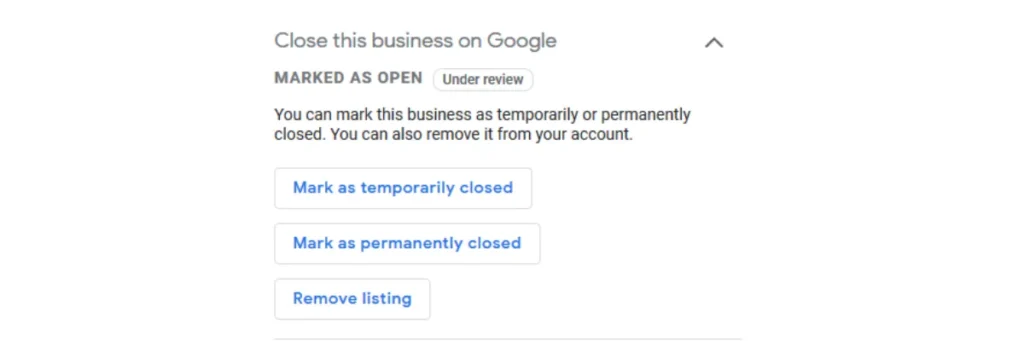
How to Mark Your Business as Permanently Closed
If your business is no longer operating, the most accurate and effective option is to mark it as permanently closed.
When you do this, Google updates the listing and clearly shows “Permanently Closed” to prevent customers from visiting the old address or calling outdated phone numbers. This protects your reputation and stops any confusion.
How to Mark It Closed:
- Go to your Google Business Profile
- Click “Edit Profile”
- Choose “Business Information”
- Scroll to “Hours”
- Select “Mark as permanently closed”
This keeps the listing visible but prevents customers from thinking you still operate normally. It also reduces the chance of Google automatically recreating the listing later.
How to Temporarily Remove Your Business Without Deleting It
Some business owners want to disappear from Google Search or Maps temporarily. In this case, you don’t want to delete the profile or close the business. Instead, you want to temporarily suspend your visibility.
Option 1: Set Your Business as “Temporarily Closed”
This allows you to pause your listing without losing data, reviews, or ranking.
Option 2: Turn Off Business Visibility
Google also offers a “Hide” or “Unpublish” option, which prevents your listing from appearing publicly but keeps all information intact.
This is ideal for businesses that plan to return and don’t want to rebuild their online presence later.
What Happens After Removing or Closing Your Business Listing
When you remove your business from Google, several things can happen depending on the method you choose:
- Deleting the profile removes your ownership but might not remove the listing if Google finds external citations.
- Marking as permanently closed tells Google to update all map and search data accordingly.
- Temporarily closing or hiding the profile keeps your information intact for future use.
It’s also important to note that customer reviews, photos, and insights become unavailable to you once the listing is deleted.
If you want to preserve your digital history, closing or hiding the listing is usually the safer option.

Need Help?
If you’ve been asking “how to remove my business from Google,” the process depends on whether you want to delete, close, or temporarily hide your listing. Understanding the differences helps you choose the right option and prevents Google from recreating the listing in the future. Whether your business is closing, relocating, or reorganizing, taking control of your online presence is essential.
If you need expert help managing your Google Business Profile or removing outdated listings, 7ten Digital Marketing is here to support you every step of the way. Contact us today to get started.
Related Posts